
How to add DHL Express and DHL Economy Select at checkout with Teleship
DHL Express and DHL Economy Select are now live in the Teleship app for Shopify and WooCommerce. Here is what they add to your store, and how to switch them on at checkout in about 10 minutes.
Why DHL on Teleship
- 200+ markets. Global coverage from the same Teleship app: DHL Express Worldwide to 200+ markets, DHL Economy Select across 39 European countries. See the full list of DHL Express and DHL Economy Select countries on our pricing page.
- Discounted DHL rates, up to 81% off. You get Teleship's negotiated rates, with no DHL account to open and no volume commitment. Fuel is included.¹
- More options for you and your customers. Offer Teleship DDP Tracked (best value, 5–7 business days), DHL Economy Select (2–5 business days across Europe) and DHL Express (1–2 days to most of the EU, 1–3 to the US) side by side, and let customers choose speed and price.
- Duties paid at checkout. Shipping, duties and taxes are in one checkout price. Your customers pay nothing at the door.
- No basket cuts. Big, heavy or high-value orders go in one DHL parcel, up to 30 kg, duty-paid. No splitting orders and no turning large baskets away.
- No €3 EU duty on UK- and EU-made goods, only on Teleship. On DHL parcels to the EU, Teleship claims preferential origin automatically, so qualifying goods enter at 0% duty (how the €3 duty works).
- The same workflow. Labels from your order list, with first-mile collection included.
¹ 1 kg parcel, compared with DHL Express UK's published 2026 rates before fuel surcharge.
Ready? Here's how to turn DHL on at checkout.
Before you start
- The Teleship app is installed and set up. Shopify app or WooCommerce plugin, with shipper details, dispatch and packaging completed (set up the Shopify app in 10 minutes).
- Your products have a weight, an HS code and a country of origin. Checkout rates are calculated from them. The HS Codes and COO page in the app sets them in bulk (product data guide).
- Shopify only: Carrier-Calculated Shipping (CCS) is enabled. See the note below.
Shopify: turn on DHL at checkout
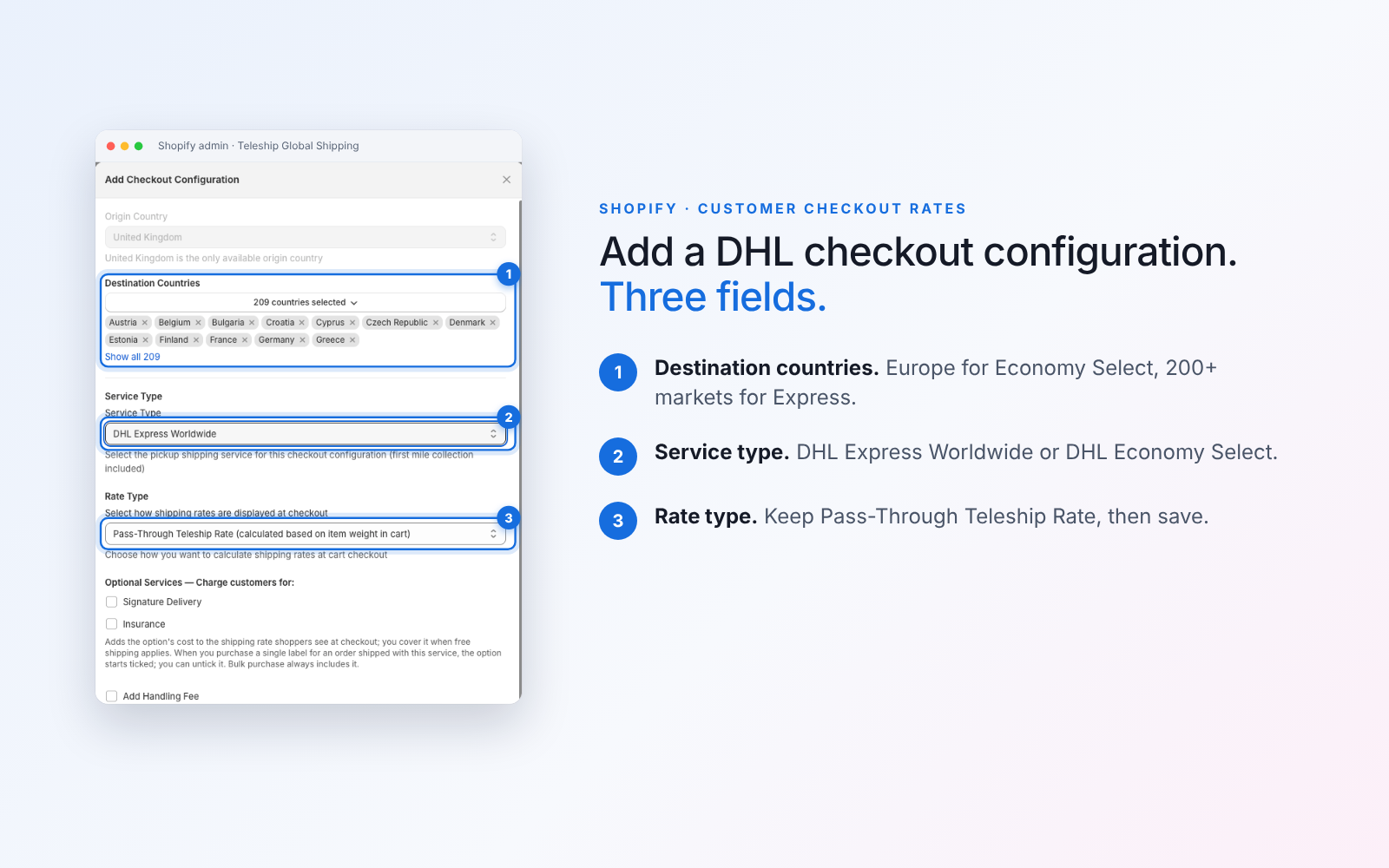
Step 1. Add a DHL checkout configuration in the Teleship app
- In Shopify admin, open Apps → Teleship Global Shipping → Settings → Customer Checkout Rates.
- Click Add. The origin country is always United Kingdom.
- Destination countries: pick the markets for this service. For DHL Economy Select, choose your European markets. For DHL Express Worldwide, choose the rest of the world, or every market where you want an express option.
- Service type: choose DHL Express Worldwide or DHL Economy Select. First-mile collection is included.
- Rate type: keep Pass-Through Teleship Rate, which is calculated from the weight of the items in the cart.
- Optional services: tick Signature delivery or Insurance if you want to charge customers for them.
- Handling fee and free-shipping threshold: set them here, not in Shopify, so they apply once and don't double up.
- Duties and taxes: leave both "My store collects import VAT / import duties at checkout" boxes unticked if you want Teleship to return duties and taxes at checkout (recommended). Tick them only if Shopify already collects them for these markets, so customers aren't charged twice.
- Click Save. Repeat for the second DHL service if you want to offer both.
Step 2. Show the rates in your Shopify shipping zones
- Go to Settings → Shipping and delivery → Shipping → Manage (general profile) → Shipping zones. Make sure each market you ship to is in a zone, otherwise it can't check out.
- In each zone, click Add rate → Use carrier or app to calculate rates → Teleship.
- Tick the services to show. At checkout customers see names like "DHL Express Worldwide (Duties Prepaid)". Tick Future services so new services appear automatically.
Step 3. Check your tax settings
- Settings → Taxes and duties: turn on Charge tax on shipping rates. In the EU, shipping is part of the VAT base.
- Duties and import taxes: if Teleship returns duties at checkout (Step 1), keep Shopify's own duty collection off for those markets. Use one or the other, never both.
Step 4. Test it
Open your storefront, add a real product to the cart and enter a full address in a DHL market (street, postcode, phone). You should see the DHL options with their prices and a duties and taxes line. Changing your browser's country doesn't simulate a checkout; enter a real address.
WooCommerce: turn on DHL at checkout
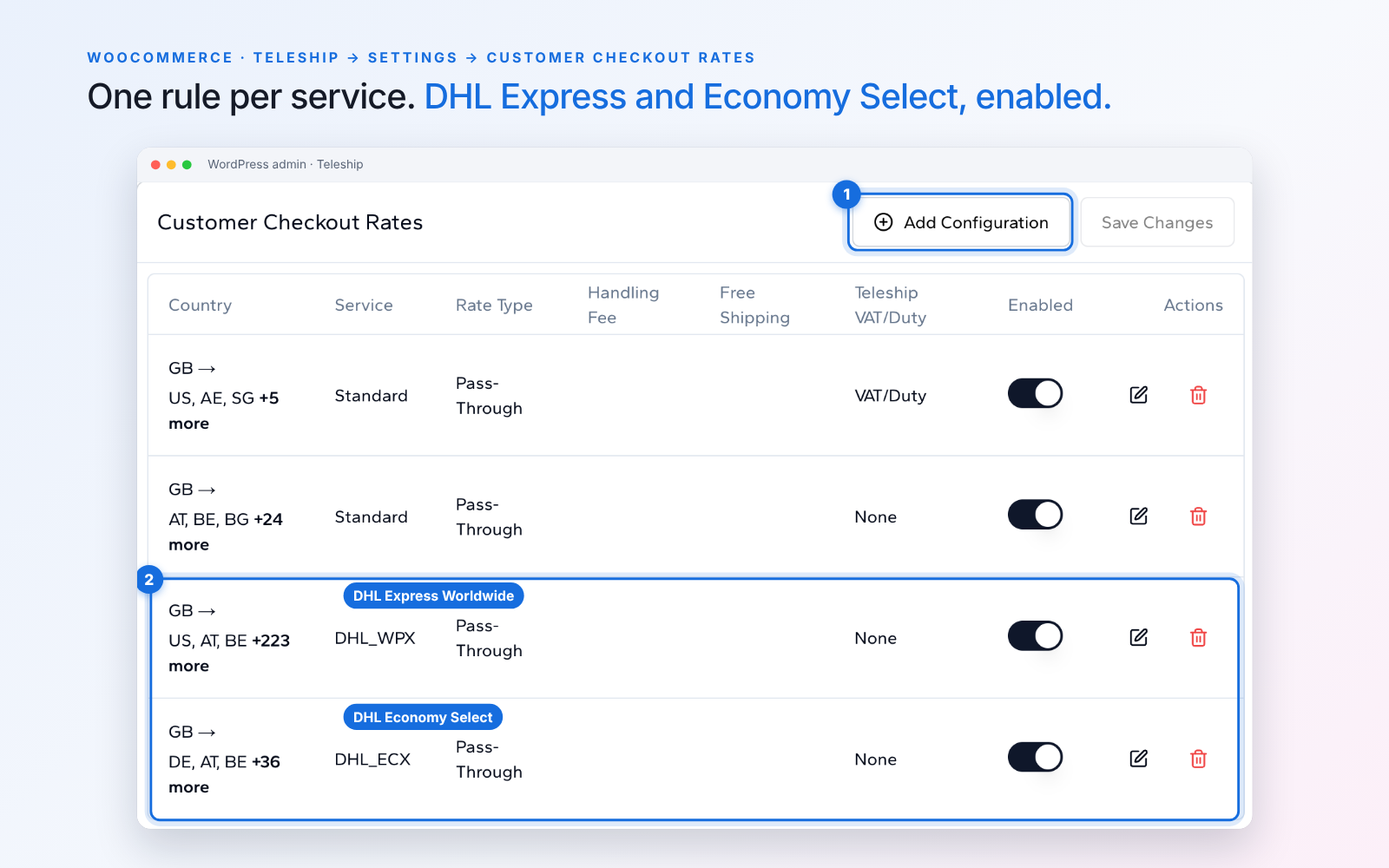
- In WordPress admin, open Teleship → Settings → Customer Checkout Rates.
- Click Add Configuration.
- Choose the destination countries and the service: DHL Express Worldwide or DHL Economy Select. Keep the rate type on Pass-Through.
- Set an optional handling fee or free-shipping threshold, and choose whether Teleship returns VAT and duty at checkout (recommended, unless your store already collects them).
- Save, check that the Enabled toggle is on, then click Save Changes.
- Test with a real product and a full address in a DHL market.
Each configuration is a rule that maps countries to one service. A rule that points a country at a service that doesn't serve it returns no rate, so split your markets into separate rules. For example:
| Rule | Countries | Service |
|---|---|---|
| 1 | EU27 and core markets | Teleship DDP Tracked |
| 2 | Europe | DHL Economy Select |
| 3 | Rest of world | DHL Express Worldwide |
Which service for which market
| Service | Where | Delivery | Best for |
|---|---|---|---|
| Teleship DDP Tracked | Core markets incl. EU27 and US | 5–7 business days | Best value, and EU orders over €150 |
| DHL Economy Select | Europe (39 countries) | 2–5 business days | EU orders under €150; no €3 duty on UK- and EU-made goods |
| DHL Express Worldwide | 200+ markets | 1–2 days to most of the EU, 1–3 to the US | Speed, late orders, rest of world |
See the full list of DHL Express and DHL Economy Select countries on our pricing page.
All three can sit side by side at checkout, so your customers choose the speed and price that suits them.
No DHL rate at checkout?
- The product has no weight, HS code or country of origin. Add them in HS Codes and COO.
- The market isn't in a Shopify shipping zone with the Teleship rate, or isn't in a checkout configuration for that service.
- The address is incomplete. Enter street, postcode and phone.
- The basket is over the service's value, size or weight limit (limits by service).
- The product is restricted (restricted items).
- Shopify only: your plan doesn't include CCS (see the note above).
Still stuck? Contact our support team.
Get the Teleship app
New to Teleship? Connect your store for free; you pay for shipping only.
Other platforms (ShipStation, Magento, Metapack, API): see all integrations
Share this article
Related Articles
Need Shipping Assistance?
Our logistics experts can help you implement the best practices described in this article.
Contact Us